


NFC Music Player
NFC Music Player
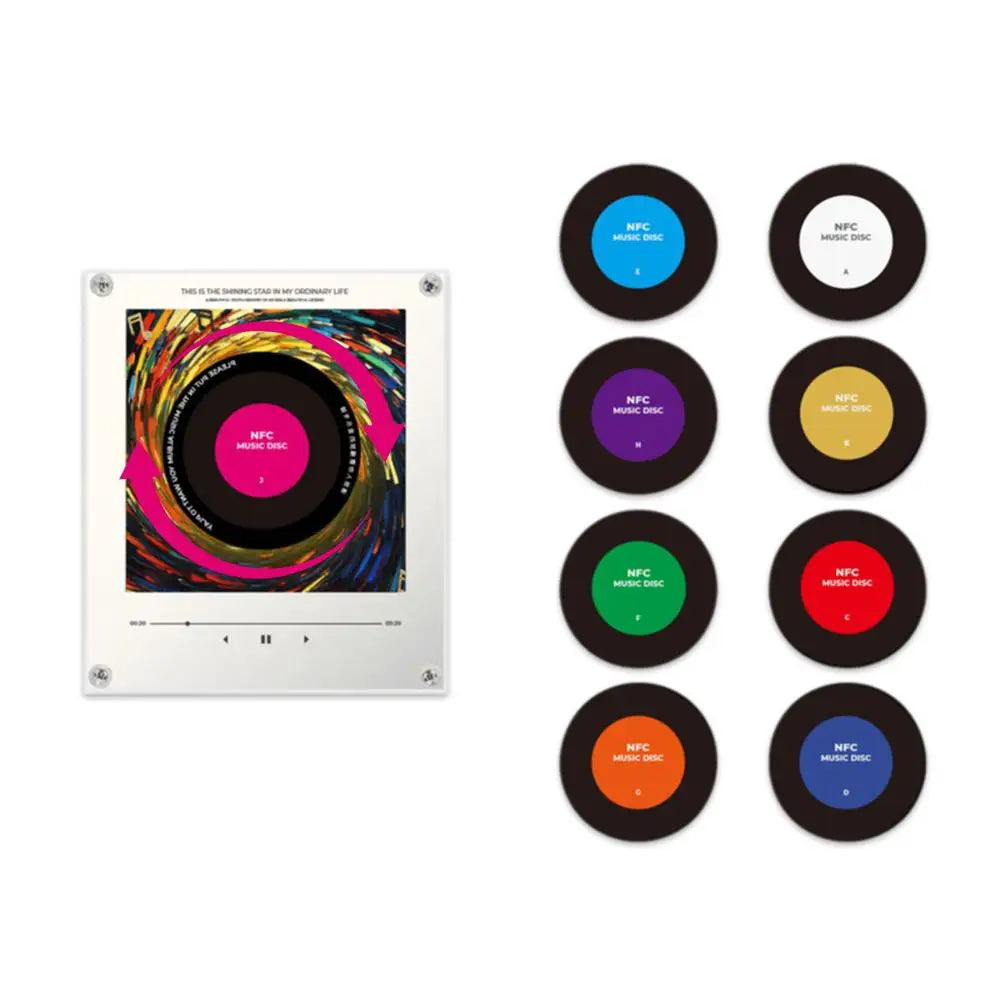
📀 NFC Music Player With LED Lights
🎵 Play Your Favorite Songs
💡 Dynamic LED Lighting Effects
💿 Includes 9 NFC Music Discs
📂 Add Your Own Music & Playlists
🎁 The Perfect Gift For Music Lovers
Couldn't load pickup availability
- One Tap To Play
- Perfect for Music Fans
- Fast, Free Shipping
IMPORTANT NOTICE *PREORDERS ONLY*
IMPORTANT NOTICE *PREORDERS ONLY*
⚠️ Pre-Order Notice: Custom 9-Image Edition
Please note that this is a custom-made pre-order item and requires additional production time before shipment.
Due to the personalized nature of each order, production may take up to 4 weeks (or longer during periods of high demand) before your order is shipped. Standard shipping times begin only after production has been completed.
📸 Custom Image Submission
This edition includes 9 fully customized NFC discs featuring your own images.
After your order is placed, we will contact you using the email address or phone number provided at checkout regarding the 9 images you want. You will send it to us from there. Please keep an eye on your inbox (and spam folder) for our message.
To ensure the best results:
• Submit exactly 9 images
• Use high-quality, clear photos whenever possible
• Square or centered images work best
• Production will begin once all 9 images have been received
Thank you for your patience while we create your personalized NFC Music Frame. Each piece is made specifically for you and is worth the extra wait.
PROCESSING & SHIPPING
PROCESSING & SHIPPING
We offer free shipping on all orders. We process orders within 1-3 business days. Once dispatched, the estimated delivery time is generally 1-2 weeks. You can also check your product status by clicking on the link.
RETURNS
RETURNS
We offer a 30 day free trial for ALL ORDERS EXCEPT orders with customized disc sets!! No questions asked, if you don't like what you get then a full 100% refund will be sent back to your bank account.
To start a return or report an issue, contact us on:
Tiktok @nihonvinyls


Order today, receive in 7 DAYS
Hassle-Free Returns
Money-Back Guarantee
We built this to last, but if something goes wrong, we've got you covered. No stress, no complicated process—just reach out and we'll make it right.
30-Day Money-Back Guarantee
Love It or Get Your Money Back
Follow us on Tiktok @runnybuddy!
Frequently Asked Questions:
Where is my tracking email? I can't track it.
You CANNOT track your order until I personally ship out the set on my end. This takes about 2-4 days depending on the amount of sets needed to be made. Once it's shipped, you will be notified either by text or email with tracking information!
I don't see my confirmation email/text. What do I do?
We recommend you check your spam and other folders for the confirmation text/email. If you can't find it please dm us on tiktok @brickbonded and we will resolve it for you.
What is the return policy?
We offer a 30 day free trial for ALL ORDERS except orders with customized discs!! No questions asked, if you don't like what you get then a full 100% refund will be sent back to your bank account.
To start a return or report an issue, contact us on:
Tiktok @nihonvinyls
How does it work?
Setting up your NFC Music Frame is quick and easy. Simply connect the frame to your PC or Mac using the included USB cable and open the device storage. Inside, you'll find 9 numbered folders (1–9), each corresponding to one of the 9 NFC music discs included with your frame. Upload a single MP3 file into each numbered folder and match the song to the disc with the same number. Once your music has been added, disconnect the frame, place a disc onto the player, and enjoy instant playback of the assigned song. For the best listening experience, we recommend keeping the frame connected to power or fully charged during use. Please note that only MP3 audio files are supported, and each disc can be assigned to one song at a time.
Is there an instruction video?
Yes! We will send you an instruction video on purchase!
Does the NFC Music Frame come with songs already loaded?
No. Due to shipping regulations, songs are not pre-loaded. You'll need to upload your own MP3 files before use.
What audio format does it support?
The NFC Music Frame only supports MP3 audio files.
How many songs can it store?
The frame includes 9 NFC discs, allowing you to assign 1 song to each disc for a total of 9 songs.
What do the numbered folders mean?
Each numbered folder matches one of the included NFC discs. For example, the song placed in Folder 1 will play when Disc 1 is placed on the frame.
How do I add my music?
Simply connect the frame to your PC or Mac using the included USB cable and place your MP3 files into the corresponding numbered folders (1–9).
Can I change the songs later?
Yes! You can update, replace, or remove songs at any time by reconnecting the frame to your computer
Does it need to stay plugged in?
While the frame can be used on battery power, we recommend fully charging it for the best performance and listening experience.
Are the NFC discs customizable?
Standard editions include pre-designed discs. If you purchase the custom 9-image edition, you'll be able to personalize all 9 discs with your own photos.
How do I submit my custom images?
After placing your order, we'll contact you via email with instructions for submitting your 9 images.